 Digital Gameday
Team Staff guides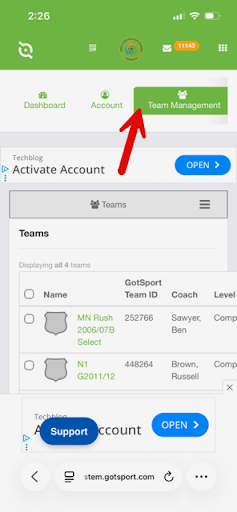
Team Staff
Managing Last-Minute Additions of Club Pass Players
At times you may need to utilize substitute players on short notice. This walks you through navigating those logistics.
All Cub Pass players need to be added to your TCSL league roster online before they will be available to add to a gameday roster in the app. This would be your TCSL Fall, Winter or Summer league roster.
2Step 2
Navigate to the Team Management tab, then click on your team name.
3Step 3
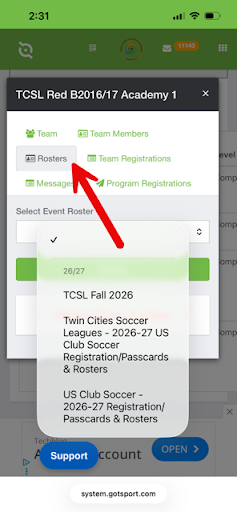
Select the Rosters tab.
4Step 4
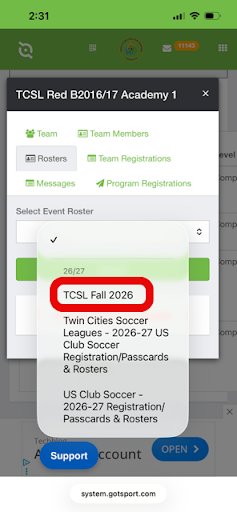
Select the appropriate league roster and click "search".
5Step 5
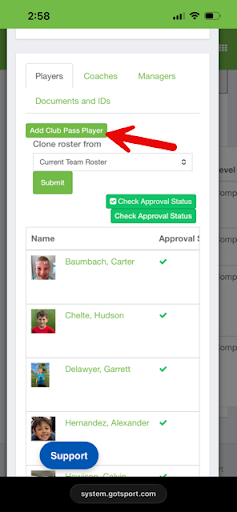
Scroll down to find the "Add Club Pass Player" button.
6Step 6
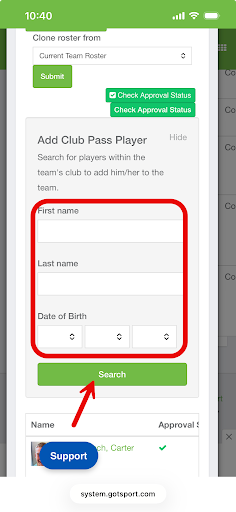
Enter the First Name, Last Name and Date of Birth for the player, then click the green search button. NOTE: Be sure to use the player's name as it exists in their GotSport profile.
7Step 7
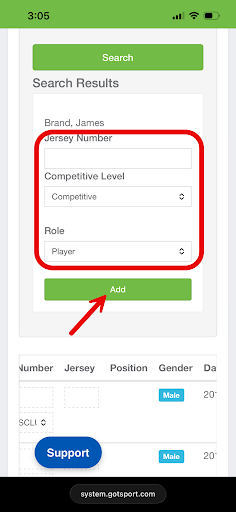
When the system pulls up the player, set the competitive level to "US Club Soccer Competitive" and enter the jersey number. Click the green "Add" button.
8Step 8
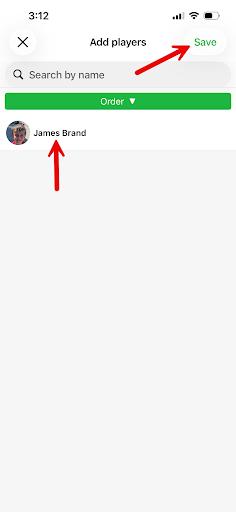
The player will now be available to add to your gameday roster either in GotSport or through the app. Once that is complete they will be reflected in the roster for team check-in with the officials.