 Digital Gameday
Team Staff guides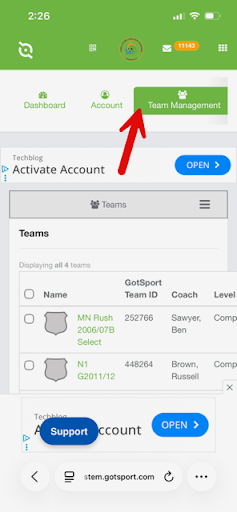
Team Staff
Managing Last-Minute Additions of Substitute Coaches
At times you may need to add a substitute coach on short notice. This walks you through those logistics.
In the event of true emergencies where it is not possible to get a coach added to the gameday roster in time for kick-off, they will be allowed to coach as long as they can present a physical or digital version of their current US Club Soccer coaching credential to match officials. Under no circumstances will uncarded individuals be allowed to coach.
2Step 2
Navigate to the Team Management tab, then click on your team name.
3Step 3
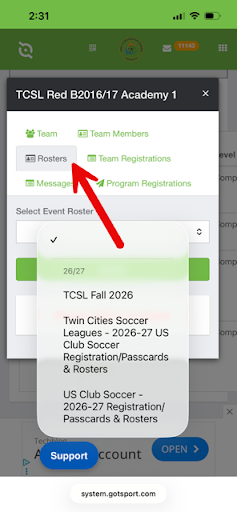
Select the Rosters tab.
4Step 4
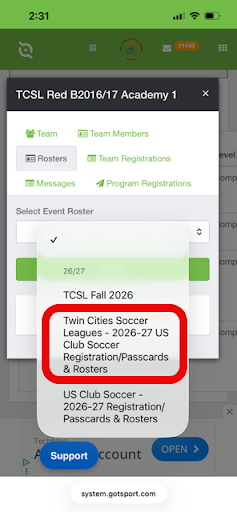
Select the TCSL Passcards & Rosters event from the dropdown and click "search".
5Step 5
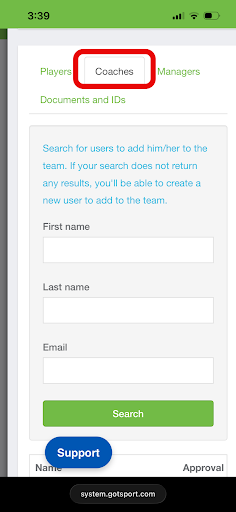
Scroll down to find the "Coaches" tab and select it.
6Step 6
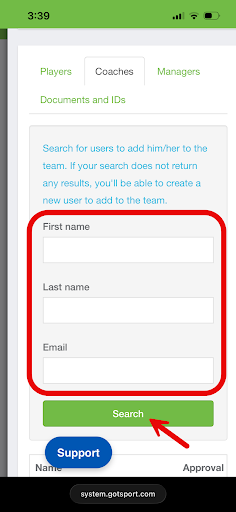
Enter the First Name, Last Name and Email Address for the Coach you wish to add and click "search". Please be sure that the name and email match their existing GotSport profile to avoid creating a duplicate profile as duplicate profiles will not be eligible through US Club Soccer.
**If you do not see this option, contact your club administrator to add the coach for you.**
7Step 7
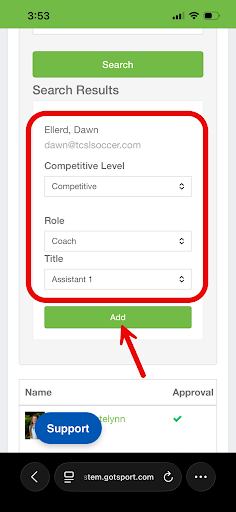
When the system pulls up the Coach profile, set the competitive level to "US Club Soccer Competitive", the Role to "Coach" and the Title to "Assistant". Click the green "Add" button.
8Step 8
The coach will now be available to add to your gameday roster in both GotSport online and the GotSport Live app. Once that is complete they will be reflected in the roster for team check-in with the officials.